
精选提示词库
可直接复制、带真实输出的 Z Image Turbo 提示词
先从 6 个用途明确、经过筛选的示例开始。每个示例都同时展示完整提示词和输出图;参考分类说明选择结构,再只替换主体、格式或限制条件。
选择提示词结构
不同分类解决不同的生产问题。先选最接近的格式,再调整创意细节。
摄影
控制场景、光线、镜头距离和真实感。
界面设计
定义层级、组件、状态和设备画框。
海报与字体
明确文案、语言、版式和对比度。
信息图
把事实组织成清晰的视觉阅读顺序。
角色系统
锁定身份、视角、表情和设定表结构。
图片编辑
分开说明要修改什么、必须保留什么。
6 个精选示例
值得保留索引的提示词
这些示例意图各不相同,有真实输出,也有足够细节说明可复用的写法。
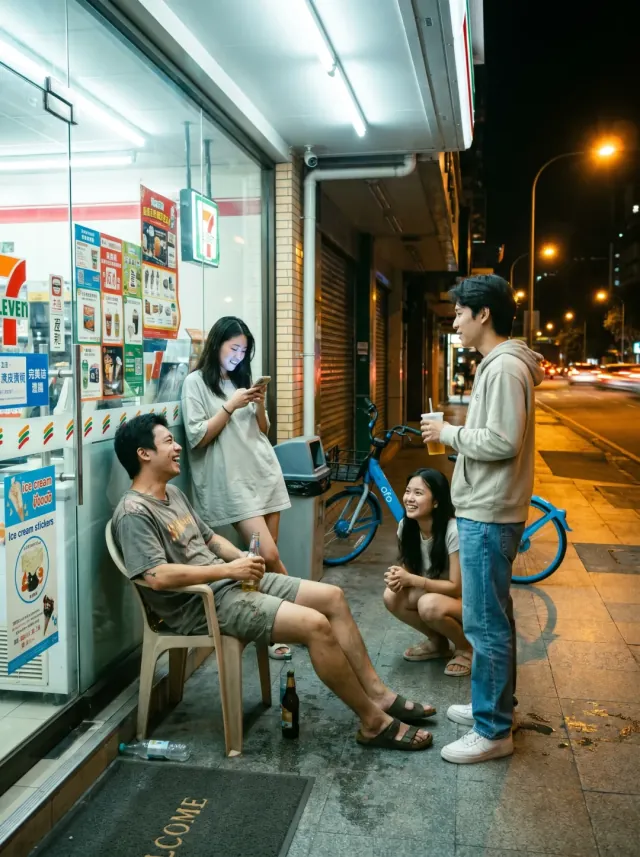
摄影
Convenience Store Night Scene
Create an ultra-realistic urban street group photo at a convenience store entrance at 10 PM summer night. 3-4 young people briefly chatting at the entrance, someone holding drinks, someone sitting on plastic outdoor chairs, someone standing looking at their phone. Bright white light streaming through the glass doors and windows, warm yellow street lights and distant car headlights outside. Characters wearing everyday clothes: T-shirts, shirts, shorts, jeans, sneakers. No internet celebrity styling. Faces and postures must look like real pedestrians, not overly polished. Environment must include real convenience store elements: freezer stickers, promotional posters, trash cans, entrance mats, glass reflections, shared bikes on roadside, water droplets from drink bottles on ground. The image should look like a very authentic life slice captured by a photographer in the city. Focus on testing natural multi-person interactions, night convenience store lighting, glass reflections, and ordinary people's vibe restoration.
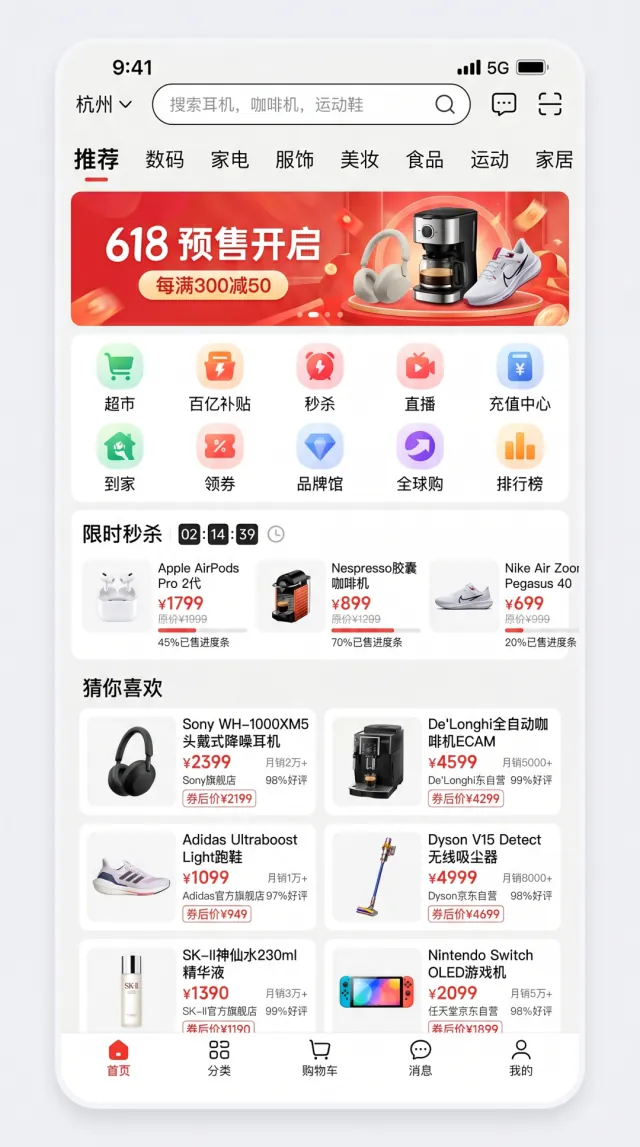
界面设计
E-commerce App Homepage
Generate a high-fidelity mobile e-commerce app homepage screenshot inspired by mainstream Chinese e-commerce apps in 2026. The interface should look fully realistic, with complete mobile-app UI logic and strong commercial design polish. Layout requirements: - status bar with time 9:41, 5G signal, and battery icon - search area with a city selector on the left, a rounded search box in the center, and message plus scan icons on the right - horizontal category tabs below the search area - top promotional carousel banner - 10-icon function grid - flash-sale module with countdown and three product cards - "guess you like" two-column product waterfall with at least 6 product cards - bottom tab bar with five tabs Use these exact Chinese labels where appropriate: - city: "杭州" - search placeholder: "搜索耳机、咖啡机、运动鞋" - category tabs: "推荐、数码、家电、服饰、美妆、食品、运动、家居" - top banner: "618 预售开启" and "每满300减50" - function grid: "超市、百亿补贴、秒杀、直播、充值中心、到家、领券、品牌馆、全球购、排行榜" - flash sale title: "限时秒杀" - recommendation section: "猜你喜欢" - bottom tabs: "首页、分类、购物车、消息、我的" All Chinese text must be clear and readable with realistic fonts. Spacing, icon style, white space, shadows, rounded corners, dividers, and tag treatments should closely resemble a real app screenshot rather than concept art.
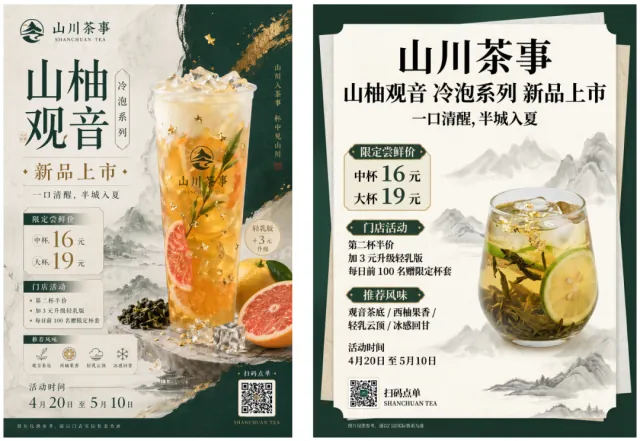
海报与字体
Chinese Tea Drink Product Launch Poster
Design a 3:4 vertical poster for a new Chinese trendy tea launch. Use a New Chinese visual style that feels light-luxury and restrained. The palette should be dark green, off-white, and gold, with rice-paper texture, elegant negative space, landscape accents, and modern layout design. Main subject: a visually appealing cold-brew tea with tea leaves, citrus, ice cubes, and touches of gold foil. The poster must accurately display the following exact Chinese copy: "山川茶事" "山柚观音" "冷泡系列" "新品上市" "一口清醒,半城入夏" "限定尝鲜价" "中杯 16 元" "大杯 19 元" "门店活动" "第二杯半价" "加 3 元升级轻乳版" "每日前 100 名赠限定杯套" "推荐风味" "观音茶底 / 西柚果香 / 轻乳云顶 / 冰感回甘" "活动时间 4月20日 至 5月10日" "扫码点单" "SHANCHUAN TEA" Fine print: "图片仅供参考,请以门店实际售卖为准" Maintain a clear promotional hierarchy while keeping the overall feeling sophisticated rather than cheap or overly e-commerce-like. Pay special attention to small text, numbers, prices, info modules, and Chinese typography aesthetics.
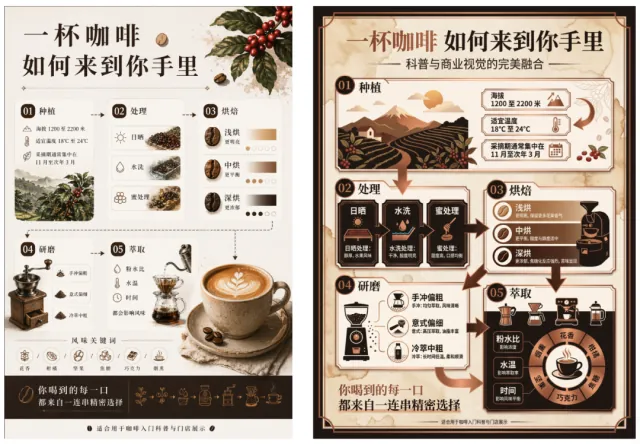
信息图
Coffee Journey Infographic
Create a Chinese infographic poster themed "一杯咖啡 如何来到你手里" ("How a Cup of Coffee Reaches You"). Use a premium information-design style with both educational clarity and commercial appeal. The layout should include directional flow, arrows, data boxes, icons, simple illustrations, and modular cards. Use coffee brown, milk white, ink black, and copper accents. The infographic must include: - 01 Planting: elevation 1200-2200m, suitable temperature 18-24C, picking season Nov-March - 02 Processing: sun-dried, washed, honey process - 03 Roasting: light roast = brighter, medium roast = balanced, dark roast = richer - 04 Grinding: pour-over = coarse, espresso = fine, cold brew = medium-coarse - 05 Extraction: powder-water ratio, water temperature, and time all affect flavor - flavor keywords: floral / citrus / nutty / caramel / chocolate / smoky Use this exact fine print: "适合用于咖啡入门科普与门店展示" The composition should balance text and visuals while keeping the design elegant. Focus on long infographic handling, numeric information, temperatures, numbered sections, concise descriptions, slash-separated flavor words, and modular layout. It should look like a premium display board, not a classroom slide deck.
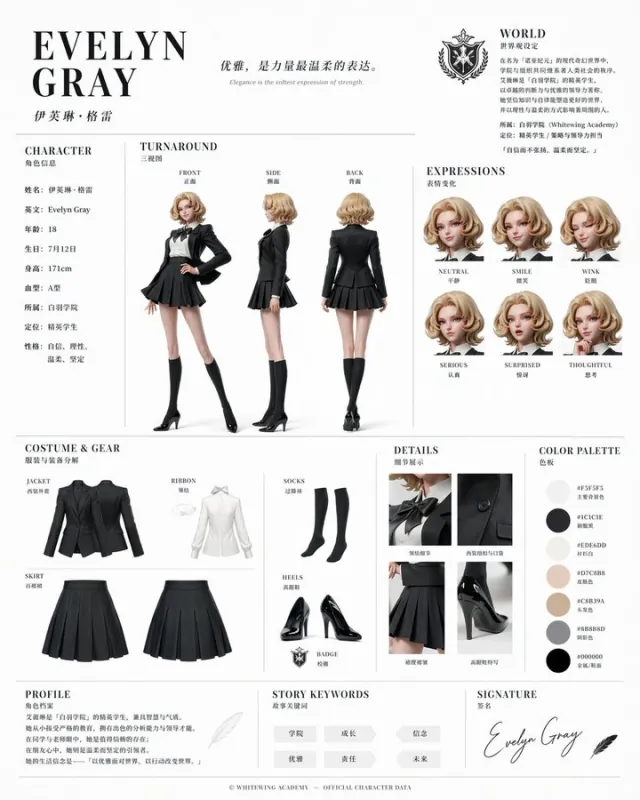
角色系统
Official Character Reference Sheet
Based on this character and background, please create a character reference sheet similar to official setting materials. - Includes three-view drawings: front view, side view, and back view - Add variations of the character's facial expressions - Break down and display detailed parts of the clothing and equipment - Add a color palette - Include a brief explanation of the worldview setting - Overall, use an organized layout (white background, illustration style)
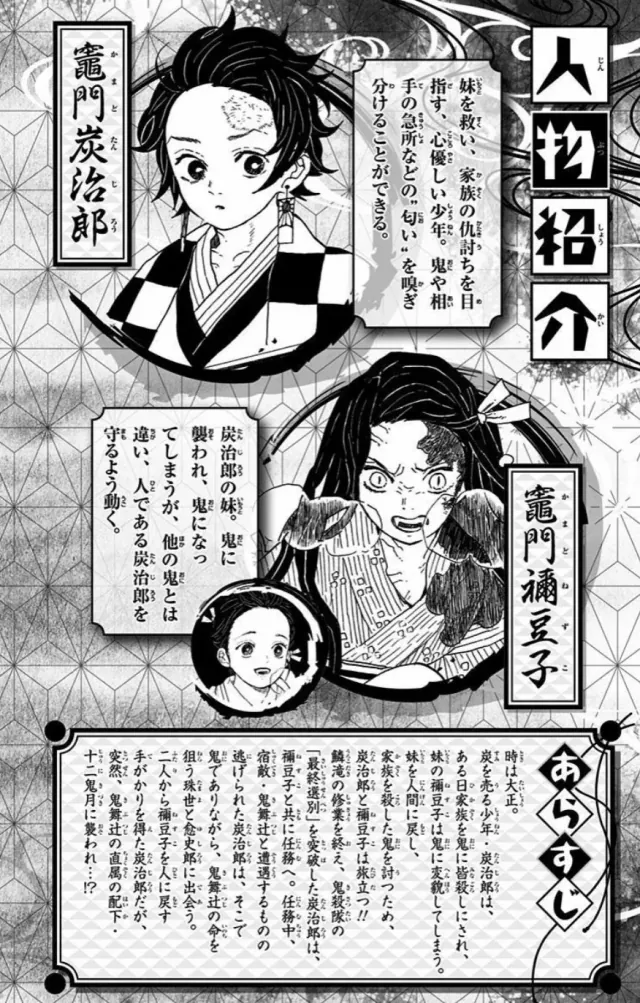
图片编辑
Comic Page Coloring & Translation
Colorize this comic page and translate it into Chinese, placing the text in the original positions while maintaining composition and image details consistently
探索更多社区输出
实时画廊用于视觉探索;上方 6 个精选示例是稳定、可索引的参考集合。
功能亮点
Z Image Turbo prompt gallery 功能亮点
这个 Z Image Turbo prompt gallery 面向快速视觉研究:先看图片,再研究生成该结果的 prompt。
图片优先的 Z Image Turbo prompt 发现方式
每个 Z Image Turbo prompt 都绑定生成图,方便先判断构图、风格、主体和渲染质量,再阅读提示词。
可复用提示词与真实输出案例
图库把可复用 AI 图片 prompt 与真实输出放在一起,帮助你识别更容易产出优质 Z Image Turbo 结果的写法。
支持参考图语境的 prompt 灵感
当作品包含参考图时,modal 会把参考图与 Z Image Turbo prompt 放在同一上下文中,方便理解输入如何影响最终图像。
使用方法
如何使用 Z Image Turbo prompts
把图库当作 prompt 研究流程,而不是单纯的文本列表。
1
先从图片结果开始筛选
在瀑布流中寻找喜欢的视觉方向,例如角色设计、产品图、海报、关系图、编辑风图片 prompt。
2
打开提示词并研究结构
点击结果,在图片旁查看完整 Z Image Turbo prompt,重点观察主体、镜头、风格、限制条件和输出要求。
3
复制、改写并生成新变体
复制提示词或发送到工作台,然后替换主体、氛围、格式或参考图细节,生成自己的 Z Image Turbo 图片。
FAQ
Z Image Turbo prompt 常见问题
关于查找、改写和提升 Z Image Turbo prompts 的常见问题。
好的 Z Image Turbo prompt 应该包含什么?
强提示词通常会描述主体、视觉风格、构图、光线、目标格式,以及让生成图片保持聚焦的限制条件。
这些 Z Image Turbo prompts 可以复用吗?
可以。建议把每条 prompt 当作起点:复用结构,再替换主体、场景、品牌语气、比例需求或参考图细节。
为什么要搭配生成图片浏览 prompt?
图片示例能更直观地判断 prompt 质量。你可以先看到某段文字产生的视觉结果,再决定如何改写。
开始创作
用 Z Image Turbo prompts 创作更好的图片
从灵感进入生成:选择一个经过真实图片验证的 Z Image Turbo prompt,为你的目标改写,并在工作台生成新图。
把 prompt 当作创意简报
从图库提示词开始,更快定义主体、场景、镜头、媒介和最终图片要求。
把案例沉淀为 prompt 模板
保存适合肖像、产品视觉、概念图、UI mockup 或社交媒体图片的 prompt 结构。
一次优化一个 Z Image Turbo prompt
对措辞、限制条件和参考图细节做小幅调整,通常能得到更清晰、更稳定的 AI 图片结果。