
Kopierfertige Z Image Turbo Prompts mit echten Ergebnissen
Starte mit sechs geprüften Beispielen für unterschiedliche Aufgaben. Vergleiche vollständigen Prompt und Ausgabe, wähle eine passende Struktur und ändere nur Motiv, Format oder Vorgaben.
Ausgewählte Prompt-Beispiele
Diese Beispiele haben eine klare eigene Absicht, sichtbare Ergebnisse und eine wiederverwendbare Struktur.
Ausgewählte Prompt-Beispiele
Diese Beispiele haben eine klare eigene Absicht, sichtbare Ergebnisse und eine wiederverwendbare Struktur.
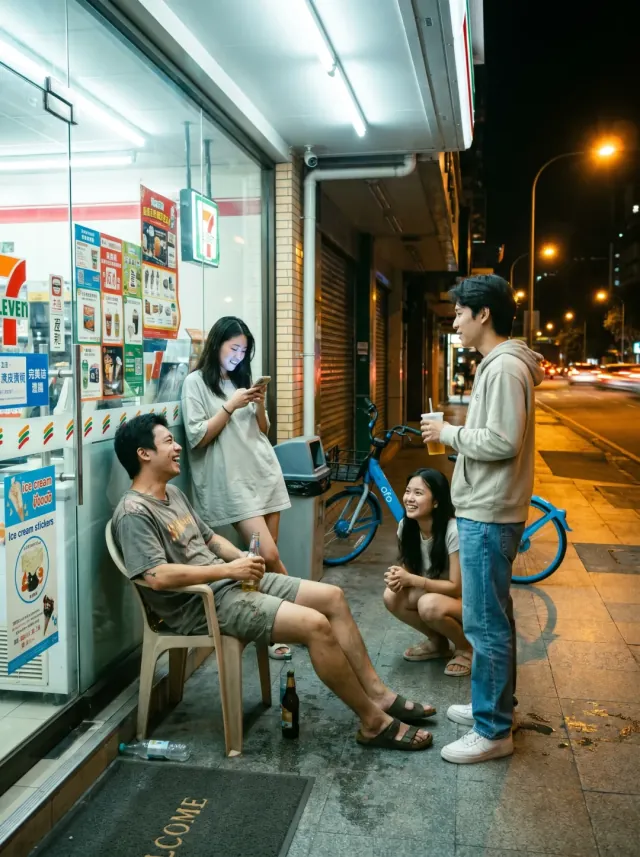
Fotografie
Convenience Store Night Scene
Create an ultra-realistic urban street group photo at a convenience store entrance at 10 PM summer night. 3-4 young people briefly chatting at the entrance, someone holding drinks, someone sitting on plastic outdoor chairs, someone standing looking at their phone. Bright white light streaming through the glass doors and windows, warm yellow street lights and distant car headlights outside. Characters wearing everyday clothes: T-shirts, shirts, shorts, jeans, sneakers. No internet celebrity styling. Faces and postures must look like real pedestrians, not overly polished. Environment must include real convenience store elements: freezer stickers, promotional posters, trash cans, entrance mats, glass reflections, shared bikes on roadside, water droplets from drink bottles on ground. The image should look like a very authentic life slice captured by a photographer in the city. Focus on testing natural multi-person interactions, night convenience store lighting, glass reflections, and ordinary people's vibe restoration.
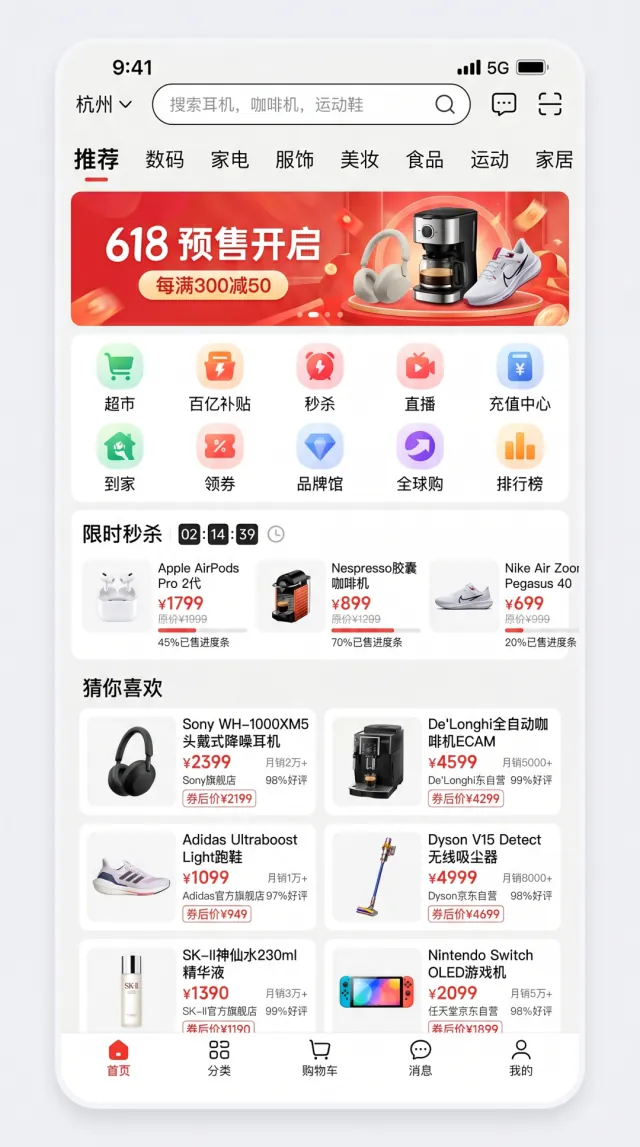
Interface-Design
E-commerce App Homepage
Generate a high-fidelity mobile e-commerce app homepage screenshot inspired by mainstream Chinese e-commerce apps in 2026. The interface should look fully realistic, with complete mobile-app UI logic and strong commercial design polish. Layout requirements: - status bar with time 9:41, 5G signal, and battery icon - search area with a city selector on the left, a rounded search box in the center, and message plus scan icons on the right - horizontal category tabs below the search area - top promotional carousel banner - 10-icon function grid - flash-sale module with countdown and three product cards - "guess you like" two-column product waterfall with at least 6 product cards - bottom tab bar with five tabs Use these exact Chinese labels where appropriate: - city: "杭州" - search placeholder: "搜索耳机、咖啡机、运动鞋" - category tabs: "推荐、数码、家电、服饰、美妆、食品、运动、家居" - top banner: "618 预售开启" and "每满300减50" - function grid: "超市、百亿补贴、秒杀、直播、充值中心、到家、领券、品牌馆、全球购、排行榜" - flash sale title: "限时秒杀" - recommendation section: "猜你喜欢" - bottom tabs: "首页、分类、购物车、消息、我的" All Chinese text must be clear and readable with realistic fonts. Spacing, icon style, white space, shadows, rounded corners, dividers, and tag treatments should closely resemble a real app screenshot rather than concept art.
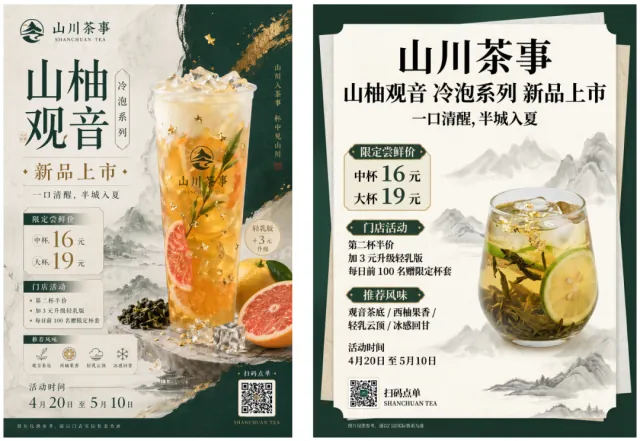
Poster und Typografie
Chinese Tea Drink Product Launch Poster
Design a 3:4 vertical poster for a new Chinese trendy tea launch. Use a New Chinese visual style that feels light-luxury and restrained. The palette should be dark green, off-white, and gold, with rice-paper texture, elegant negative space, landscape accents, and modern layout design. Main subject: a visually appealing cold-brew tea with tea leaves, citrus, ice cubes, and touches of gold foil. The poster must accurately display the following exact Chinese copy: "山川茶事" "山柚观音" "冷泡系列" "新品上市" "一口清醒,半城入夏" "限定尝鲜价" "中杯 16 元" "大杯 19 元" "门店活动" "第二杯半价" "加 3 元升级轻乳版" "每日前 100 名赠限定杯套" "推荐风味" "观音茶底 / 西柚果香 / 轻乳云顶 / 冰感回甘" "活动时间 4月20日 至 5月10日" "扫码点单" "SHANCHUAN TEA" Fine print: "图片仅供参考,请以门店实际售卖为准" Maintain a clear promotional hierarchy while keeping the overall feeling sophisticated rather than cheap or overly e-commerce-like. Pay special attention to small text, numbers, prices, info modules, and Chinese typography aesthetics.
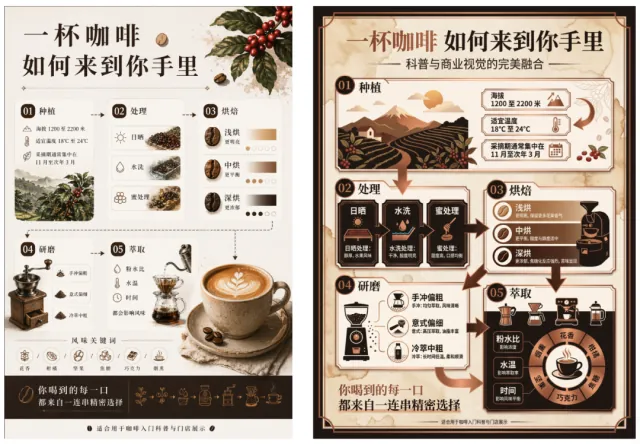
Infografiken
Coffee Journey Infographic
Create a Chinese infographic poster themed "一杯咖啡 如何来到你手里" ("How a Cup of Coffee Reaches You"). Use a premium information-design style with both educational clarity and commercial appeal. The layout should include directional flow, arrows, data boxes, icons, simple illustrations, and modular cards. Use coffee brown, milk white, ink black, and copper accents. The infographic must include: - 01 Planting: elevation 1200-2200m, suitable temperature 18-24C, picking season Nov-March - 02 Processing: sun-dried, washed, honey process - 03 Roasting: light roast = brighter, medium roast = balanced, dark roast = richer - 04 Grinding: pour-over = coarse, espresso = fine, cold brew = medium-coarse - 05 Extraction: powder-water ratio, water temperature, and time all affect flavor - flavor keywords: floral / citrus / nutty / caramel / chocolate / smoky Use this exact fine print: "适合用于咖啡入门科普与门店展示" The composition should balance text and visuals while keeping the design elegant. Focus on long infographic handling, numeric information, temperatures, numbered sections, concise descriptions, slash-separated flavor words, and modular layout. It should look like a premium display board, not a classroom slide deck.
Charakter-Systeme
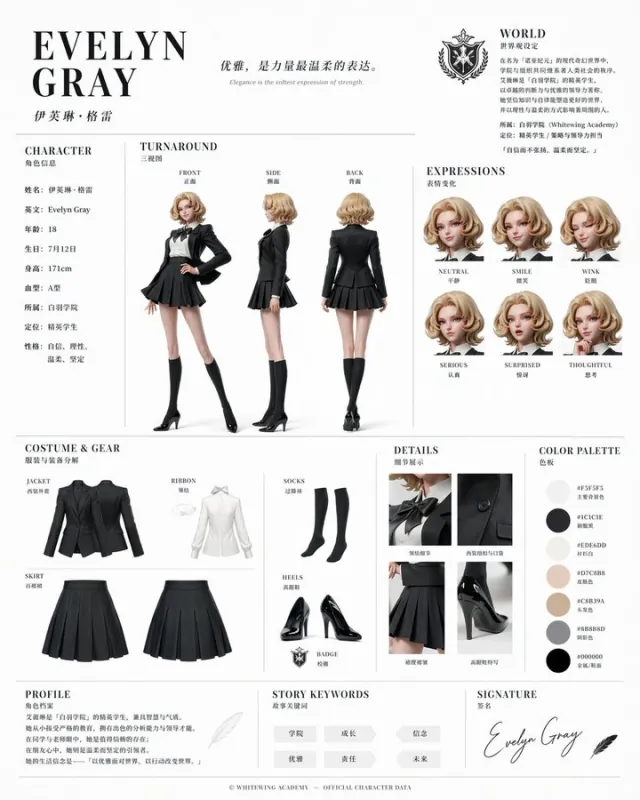
Official Character Reference Sheet
Based on this character and background, please create a character reference sheet similar to official setting materials. - Includes three-view drawings: front view, side view, and back view - Add variations of the character's facial expressions - Break down and display detailed parts of the clothing and equipment - Add a color palette - Include a brief explanation of the worldview setting - Overall, use an organized layout (white background, illustration style)
Bildbearbeitung
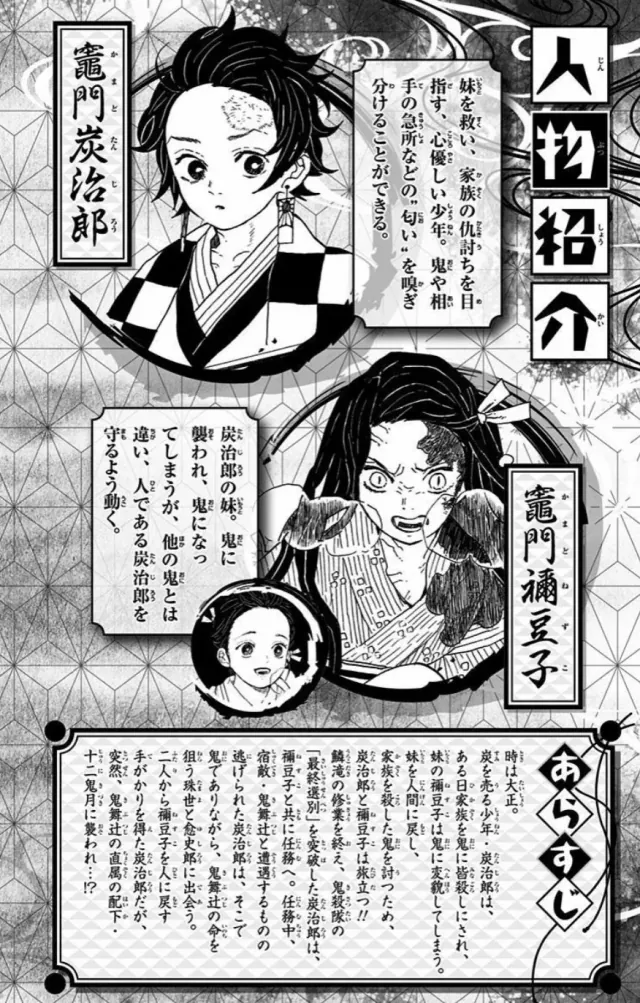
Comic Page Coloring & Translation
Colorize this comic page and translate it into Chinese, placing the text in the original positions while maintaining composition and image details consistently
Weitere Community-Ergebnisse
Die Live-Galerie dient der visuellen Suche; die sechs Beispiele oben bilden das stabile, indexierbare Referenzset.
Z Image Turbo prompt gallery features
Entdecke echte Z Image Turbo prompt Beispiele mit generierten Bildern. Öffne ein Bild, prüfe den Prompt und nutze die Formulierung für deinen nächsten AI-Image-Workflow.
Image-first Z Image Turbo prompt discovery
Each Z Image Turbo prompt is paired with a generated image, making it easier to judge style, composition, subject, and quality before copying the prompt.
Reusable prompts with real AI image output
Use real generated examples to identify prompt structures that work well for portraits, products, posters, diagrams, and creative concepts.
Reference-aware image prompt ideas
When reference images are available, the prompt view keeps them close to the full Z Image Turbo prompt so you can understand how inputs affect output.
How to use Z Image Turbo prompts
Use this gallery as a practical prompt research workflow for Z Image Turbo image generation.
1
Choose a visual result first
Start with an image that matches your goal, then open it to inspect the Z Image Turbo prompt behind the result.
2
Study the prompt structure
Look for subject details, style words, camera direction, composition, lighting, and constraints that make the image more specific.
3
Copy and adapt the Z Image Turbo prompt
Reuse the structure, then change the subject, scene, mood, format, or reference details to create your own AI image.
Z Image Turbo prompt FAQ
Answers about finding and adapting Z Image Turbo prompts from this gallery.
What makes a good Z Image Turbo prompt?
A good prompt describes the subject, visual style, composition, lighting, format, and constraints that keep the generated image focused.
Can I reuse these Z Image Turbo prompts?
Yes. Use each prompt as a starting point and adapt the structure for your own subject, brand tone, scene, or image format.
Why browse prompts with generated images?
Generated images make prompt quality easier to judge because you can see the visual outcome before adapting the text.
Create better images with Z Image Turbo prompts
Entdecke echte Z Image Turbo prompt Beispiele mit generierten Bildern. Öffne ein Bild, prüfe den Prompt und nutze die Formulierung für deinen nächsten AI-Image-Workflow.
Use a prompt as a creative brief
Start from a working prompt to define subject, scene, style, camera, and final image requirements faster.
Turn examples into prompt templates
Save useful structures for portraits, product visuals, concept art, UI mockups, and social images.
Refine one prompt at a time
Small edits to wording, constraints, and references can make Z Image Turbo results clearer and more reliable.